
Public Storage
Public Storage AppsBusiness
3.36.32K Reviews
- Version
- 2.34.0
- Installs
- 1.00M
- Age Rating
- Everyone
Screenshots
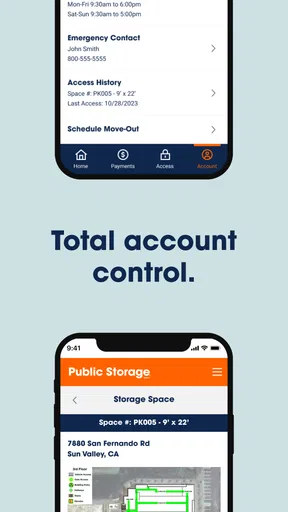
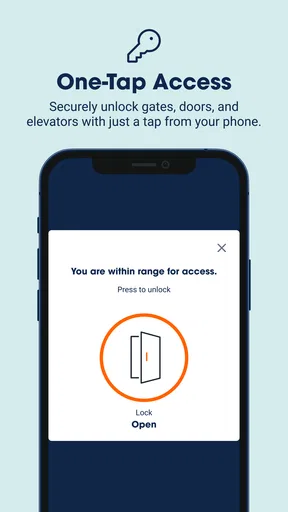
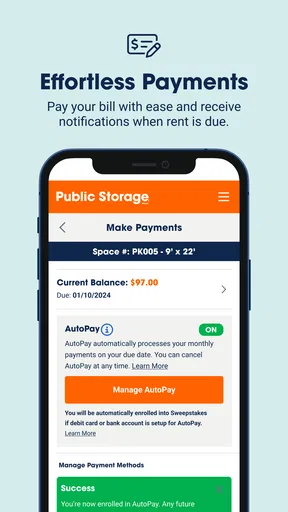
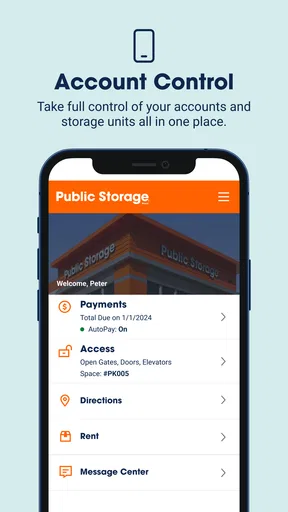
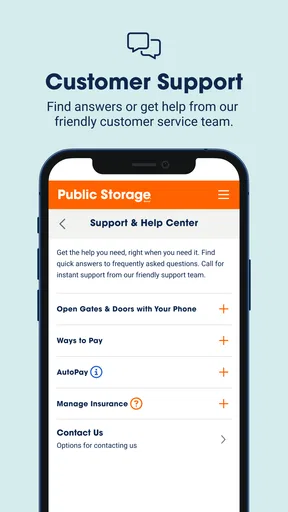

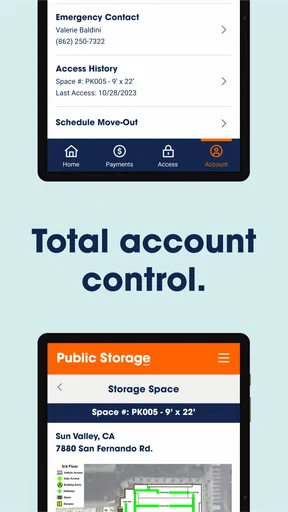
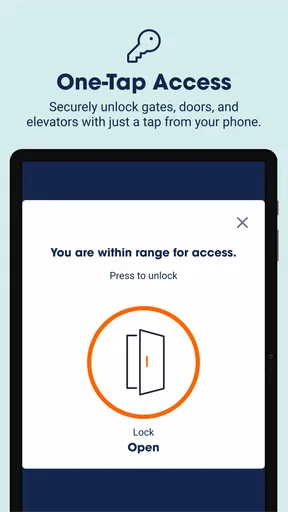
Our Review of Public Storage
 Analysis by Appyee
Managing a storage unit can easily become one more chore to remember, especially when payments, access details, and account information are scattered between emails, browser tabs, and paper notes. Public Storage is a free business app from Public Storage Apps that brings the company’s storage-related account tasks into one mobile place. I found its appeal less in flashy extras and more in the simple idea of handling storage while I am away from a computer.
The app is aimed at people who already use Public Storage, rather than anyone looking for a general inventory manager or a marketplace for comparing storage companies. That distinction matters. If your storage needs are tied to this provider, the app can reduce everyday friction. If you rent from another company, there is little reason to install it just because the category says business.
What using Public Storage feels like in everyday life
My first impression is that this is a practical account-management tool, not an app I would open for entertainment or frequent browsing. Its purpose is to make storage administration more accessible from a phone. That can be useful when I am standing outside a facility, moving boxes, checking something before a trip, or trying to deal with an account without sitting at a desk.
The developer presents it as an all-in-one way to manage a storage space, and that description fits the role it is meant to play. The important benefit is having storage-related activity in one dedicated place instead of relying entirely on a mobile browser. A focused app can feel more direct when the task is urgent and I do not want to search through bookmarks or old messages.
Still, I would not confuse “all-in-one” with “everything a storage renter could ever need.” The app’s usefulness depends on the relationship between the user and Public Storage. It is not a replacement for physically visiting a unit, organizing belongings, measuring boxes, or keeping a separate record of what is inside. I see it as the administrative side of storage, not the storage process itself.
The cost question is refreshingly simple
Public Storage is free to install and use as an app. That makes the decision straightforward from a purchase perspective: I do not have to pay an app fee just to keep access to storage-related account tools on my phone. The storage rental itself is a separate matter, so free app access should not be mistaken for free storage.
This distinction is important for anyone comparing value. The app does not create value by replacing the underlying rental cost. Its value comes from convenience: fewer steps for account tasks, easier access when away from a computer, and a central mobile route for dealing with a Public Storage space. For an existing customer, that convenience may be worthwhile even though it does not reduce the cost of the unit.
I also like that the app’s free status makes it low-risk to try. Someone can install it, see whether it fits their routine, and remove it if it adds no benefit without having paid for a separate digital product. That is a better proposition than an app that charges a subscription for basic account access. The practical question is not “is it affordable?” but “does it save me enough effort to deserve a place on my phone?”
Where the app delivers real value
The strongest use case is routine storage administration. Imagine I am preparing for a move and using a unit for several months. I am already dealing with boxes, transport, schedules, and changing plans. Having a dedicated Public Storage app gives me a more convenient starting point for storage-related tasks than hunting through a general web browser every time.
A second useful situation is the quick check before visiting the facility. I may be on the road, coordinating with a family member, or trying to sort out a storage detail while carrying other responsibilities. A phone app is better suited to those short moments than a desktop-only workflow. It keeps the storage account conceptually separate from email, which can otherwise become a poor long-term filing system.
There is also value for people who manage storage for someone else. A family member might need to help with an account, or a small business owner might need to keep storage administration distinct from sales and accounting apps. The app does not eliminate the need for clear communication, but a dedicated account tool can make the handoff less confusing than passing around screenshots and message threads.
One practical habit I would recommend is using the app as the starting point for storage administration, while keeping important personal records elsewhere. I would still maintain my own list of stored items, photographs of valuable belongings, and reminders for moving or reviewing the unit. That division of labor is useful: the app handles the provider-facing side, while my own notes handle the contents and decisions that only I can track.
Another non-obvious advantage is reducing context switching. Storage is often an occasional task, so I may forget where I last handled it. A dedicated app gives me a recognizable place to return to instead of rebuilding the process from memory. That is a small benefit, but it becomes noticeable during busy periods such as moving house, renovating, or clearing an estate.
How it compares with the usual alternatives
The most obvious alternative is the mobile website. A browser can be perfectly adequate for occasional use, and it may be the better choice for someone who dislikes installing single-purpose apps. The advantage of the dedicated app is convenience and familiarity; the browser’s advantage is that it avoids adding another app and may fit people who manage many services from one place.
Email is another common alternative, but it is not really a complete replacement. Email is useful for confirmations and reminders, yet it is not designed to serve as a clean control point for an ongoing storage relationship. Searching an inbox can work, but it is slower when I need to act rather than simply find a message.
General finance or household-management apps also have a different purpose. They can help me track spending or reminders, but they do not stand in for a provider-specific storage account tool. I would use a finance app to understand the wider cost of storage and a personal checklist to manage contents; I would use Public Storage for the provider-facing tasks it supports.
That separation helps avoid unrealistic expectations. This is not a universal storage organizer that can manage units from several companies in one dashboard. If I rent from multiple providers, I may still need separate apps or browser accounts. In that situation, the convenience of a dedicated app is balanced by fragmentation across services.
Small workflow improvements that make it more useful
The first improvement is to decide what the app is responsible for before relying on it. I would use it for Public Storage account administration, then keep a separate inventory with box labels, room names, and photographs. This prevents a common mistake: assuming that access to the rental account equals knowledge of what is physically stored.
The second is to build a simple review routine around it. When I am actively using a unit, I would check my storage arrangements whenever I make a major change at home or in the business. The app can be the reminder to revisit the account, while my own notes help answer whether I still need the space. This is where the free app can support better decisions without pretending to make those decisions for me.
The third is to treat mobile convenience as helpful but not infallible. Before an important move or visit, I would make sure I know the relevant details I need rather than depending on a last-second phone session. A dedicated app reduces friction, but it does not remove the need for planning. That is especially true when other people, vehicles, or valuable belongings are involved.
Finally, I would keep the app updated when possible. The current version is 2.29.0, and using the current release is generally sensible for an account-management tool because service connections and layouts can change over time. I would not install it on an unsupported older device, either; it requires Android 7.0 or later, which is worth checking before troubleshooting an installation problem.
Where the experience may fall short
The biggest limitation is that the app is narrowly tied to Public Storage. That is not a flaw for the company’s customers, but it makes the app irrelevant to renters elsewhere. A person comparing facilities, managing a mixed portfolio of storage providers, or searching for a neutral inventory system would be better served by a browser, a general organizer, or the tools offered by each provider.
There is also a difference between digital convenience and complete control. An app can make account tasks easier, but it cannot solve unclear household responsibilities, forgotten items, or poor labeling inside the unit. If my real problem is that I cannot find anything in storage, Public Storage will not replace a detailed inventory system. I would need to combine it with a spreadsheet, notes app, or photo archive.
Occasional users may not notice enough benefit to justify another installation. If I visit a unit rarely and already know how to reach my account through a browser, the app may simply duplicate a process I am comfortable with. Free access removes the financial objection, but it does not remove the attention cost of maintaining another app.
The average rating is 3.4 from around 43 thousand ratings, with over 6 thousand written reviews. I read that as a signal to keep expectations practical rather than assuming a flawless experience for every phone and account situation. The app has a broad audience, with over a million installs, but popularity does not guarantee that every workflow will feel equally smooth. My advice is to judge it by whether it makes your own Public Storage routine easier, not by the install count alone.
The age rating is Everyone, which suits the app’s administrative purpose. That does not mean every storage-related decision is simple or suitable for every household; it simply reflects that the app itself is designed as a general account tool rather than mature entertainment. I would still be careful about sharing account access, especially when more than one person helps manage a unit.
Who will get the most from it?
I think Public Storage is most useful for current renters who regularly handle their account from a phone. It is also a reasonable choice for people in the middle of a move, renovation, downsizing project, or business transition, when storage administration becomes more frequent than usual. In those periods, a dedicated place for the provider relationship can save small amounts of time that add up.
It may also suit people who are less comfortable navigating a mobile browser. A recognizable app icon and a focused workflow can feel easier than opening a browser, finding the correct page, and remembering which account route to use. The benefit is not technical sophistication; it is reducing the number of decisions between “I need to manage storage” and “I am in the right place.”
I would skip it if I do not use Public Storage, if I need one dashboard for several storage companies, or if my main goal is cataloging possessions. I would also skip it if I only need a one-time piece of information and already have a reliable browser routine. In those cases, the app adds little beyond duplication.
My verdict on downloading it
For a Public Storage customer, this is an easy app to justify trying because it is free and focused on a real recurring task. I would not describe it as essential for everyone, but I can see its value whenever storage administration is part of a busy week rather than an occasional afterthought. The best results come from pairing it with a personal inventory and calendar reminders, not expecting it to manage the physical contents of a unit.
My recommendation is therefore conditional but positive: install it if you want a dedicated mobile route for your Public Storage account, especially during a move or an extended rental. Keep the browser as a backup and your own records for belongings, dates, and decisions. If you are looking for a provider-neutral storage organizer, a broader household-management tool will be a better match.
Public Storage Apps released the app on December 7, 2020, and its current version shows that it remains an actively relevant part of the company’s mobile offering. After using it as a practical account companion, my conclusion is simple: it earns its place through convenience, not through replacing the rest of your storage planning. For the right renter, that is enough to make the free download worthwhile.
Privacy and Permissions
See what permissions an app requests and how it handles your data.
- Device & app history
- retrieve running apps
- Location
- approximate location (network-based), precise location (GPS and network-based)
- Photos/Media/Files
- read the contents of your USB storage, modify or delete the contents of your USB storage
- Storage
- read the contents of your USB storage, modify or delete the contents of your USB storage
- Camera
- take pictures and videos
- Wi-Fi connection information
- view Wi-Fi connections
- Other
- view network connections, pair with Bluetooth devices, access Bluetooth settings, full network access, run at startup, control vibration, prevent device from sleeping
Verdict
Strengths of Public Storage
- Conveniently manage reservations and payments from your phone.
- Multiple storage unit sizes help match different space requirements.
- Flexible access options may suit short- or long-term storage needs.
- Locations can be searched quickly using map and address tools.
- Useful reminders can help prevent missed payments or rental deadlines.
Limitations of Public Storage
- Pricing and availability can vary significantly by location.
- Some features may require an active Public Storage rental account.
- Extra fees may apply for insurance, locks, or late payments.
- App usefulness is limited if there are no nearby Public Storage facilities.
- Customer support response times may vary depending on the issue.
Similar Picks in This Category
View All
LinkedIn: Community & Network
LinkedIn3.8

Zoom Workplace
zoom.com4.1

Microsoft Teams
Microsoft Corporation4.6

Meta Business Suite
Meta Platforms, Inc.4.6

Webex Meetings
Cisco Systems, Inc.4.5

TeamViewer Remote Control
TeamViewer4.4
Frequently Asked Questions
What is the Public Storage app used for?
The Public Storage app is designed to help customers manage their storage unit and account from a mobile device. Depending on the facility and services available, you can review account details, make payments, check your balance, receive important notifications, and find information about your rented unit. It is especially useful for handling basic storage tasks without visiting the office or using a desktop browser.
Can I rent a storage unit through the Public Storage app?
In many cases, the app or Public Storage mobile experience can help you browse available units, compare sizes, review pricing, and begin the rental process. Availability and specific features may vary by location, so some users may be redirected to the Public Storage website or asked to complete part of the process with a facility representative. Before renting, check fees, access hours, insurance requirements, and cancellation terms carefully.
Can I make payments and manage my billing in the app?
Yes, the Public Storage app is primarily useful for account and payment management. Customers can generally view their account information, check balances, and make scheduled or one-time payments using an available payment method. Payment options and automatic-payment settings may differ depending on your account. Always confirm that a payment was successfully processed and review your statement for late fees or other charges.
Does the Public Storage app let me open the storage facility gate or unit?
Some Public Storage locations may offer mobile access features, but availability depends on the facility, security system, device compatibility, and your account permissions. Where supported, the app may help you access a gate or designated entry point after you sign in and enable the required permissions. It should not be assumed that every location supports digital entry, so verify access instructions with your specific facility.
Is the Public Storage app free, and what should I check before downloading it?
The Public Storage app is generally free to download, although renting a unit, purchasing insurance, paying administrative charges, or using storage services can involve separate costs. Before installing it, confirm that you are downloading the official application from the Apple App Store or Google Play. Review the developer name, recent ratings, requested permissions, privacy information, and device requirements to avoid unofficial or misleading downloads.
